What to Look for in a Flight Simulator Control Panel
As flight simulation continues to evolve, so do the expectations of pilots who want a more realistic and immersive experience.
While software like Microsoft Flight Simulator delivers stunning visuals and accurate flight models, your hardware ultimately defines how you interact with the cockpit.
Choosing the right flight simulator control panel can dramatically improve both realism and usability, but not all panels are created equal.
Why a Dedicated Control Panel Matters
Relying on a keyboard and mouse for cockpit functions quickly becomes limiting.
A dedicated control panel replaces those limitations with intuitive, physical controls that mirror real-world aircraft systems.
The result is a more natural workflow, faster access to critical functions, and a significantly more immersive experience.
Key Features to Look For
1. Realistic Control Layout
A good control panel should reflect actual cockpit workflows.
Look for logical placement of switches and controls that align with real-world aviation procedures. This makes it easier to learn, remember, and execute tasks efficiently.
2. Dedicated Magneto and Engine Controls
Engine startup is one of the most interactive parts of flying.
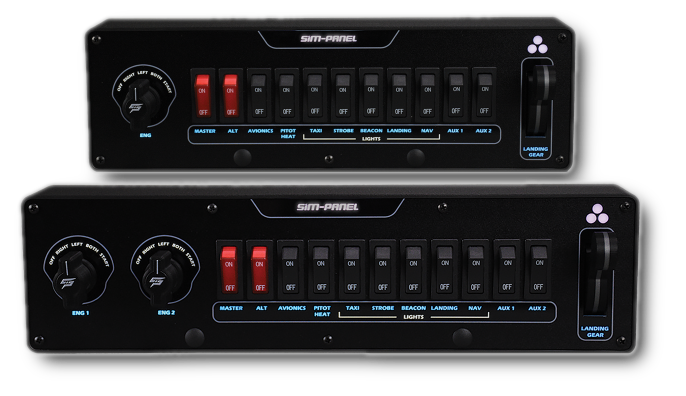
A quality panel should include magneto controls with a spring-loaded START position, allowing you to replicate real ignition sequences rather than relying on simple key presses.
3. Landing Gear Control with Feedback
Landing gear operation should feel deliberate and visual.
Panels that include a physical gear lever with THREE-IN-THE-GREEN indication provide both tactile and visual confirmation, just like in real aircraft.
4. Toggle Switches for Essential Systems
Critical aircraft systems should be accessible through dedicated switches.
- Master battery and alternator
- Avionics
- Landing, taxi, and navigation lights
- Pitot heat and auxiliary functions
Having these mapped to physical controls improves both speed and realism.
5. Build Quality and Durability
A control panel should feel solid and reliable.
Look for high-quality materials, firm switch engagement, and consistent performance over time. Cheap hardware can quickly become frustrating and unreliable.
6. Customization and Flexibility
Every pilot’s setup is different.
The ability to customize button assignments, lighting, and control functions ensures your panel adapts to your preferred aircraft and workflow.
7. Ease of Integration
A good panel should work seamlessly with your simulator.
Compatibility with Microsoft Flight Simulator, X-Plane, and other platforms is essential, along with straightforward setup and mapping.
Who Should Invest in a Control Panel?
- New users looking to simplify cockpit interaction
- Intermediate pilots wanting more realism without a full cockpit build
- Advanced sim users seeking efficiency and precision
- Anyone tired of relying on keyboard shortcuts for critical functions
The SIM-PANEL Approach
SIM-PANEL designs its hardware with a focus on realism, usability, and quality.
The AERO FlightMate™ combines essential cockpit controls into a single, streamlined interface, making it an ideal solution for both new and experienced flight simulation enthusiasts.
- Authentic magneto control with spring-loaded START
- Realistic landing gear lever with THREE-IN-THE-GREEN LED indication
- Dedicated toggle switches for common aircraft systems
- Customizable backlit labels for clarity and visibility
It delivers the feel of a real cockpit without the complexity of a full-scale setup.
Make the Right Upgrade
Choosing the right flight simulator control panel is one of the most impactful upgrades you can make to your setup.
It improves workflow, enhances realism, and allows you to interact with your simulator the way it was meant to be experienced.
If you’re ready to move beyond the keyboard and take control of your cockpit, the right hardware makes all the difference.
Command your simulation.
