KNOWLEDGEBASE
From time to time, either due to user preference or necessity, you may wish to adjust the rotational orientation of the Air Brake Knobs incorporated within your SIM-PANEL. When doing so, it's vitally important to ensure the correct "air-gap" between the metal switch surface and the knob surface is adjusted correctly to ensure reliable and durable operation.
WHEN SET TOO TIGHT (NO AIR-GAP): It's possible for the knob to come in contact with the switch surface too soon, thus preventing the full disengagement (plunge) of the switch.
WHEN SET TOO LOOSE (LARGE AIR-GAP): May potentially expose the switch to damage when an excessive amount of force is used to push/deactivate the switch. Such as "punching the knob" as real truckers may often do.
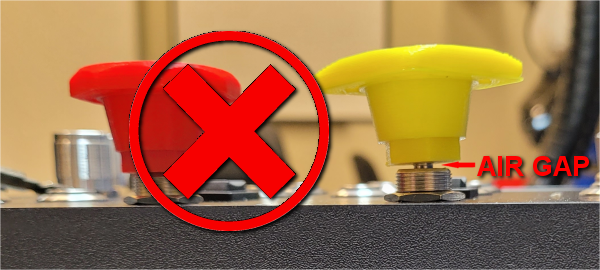
WHEN SET CORRECTLY: Full travel of the switch is preserved while ensuring optimum protection against damage.
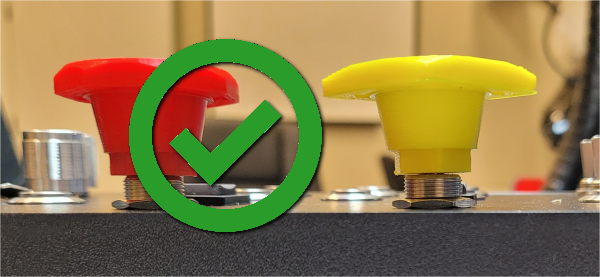
WHEN SET TOO TIGHT (NO AIR-GAP): It's possible for the knob to come in contact with the switch surface too soon, thus preventing the full disengagement (plunge) of the switch.
WHEN SET TOO LOOSE (LARGE AIR-GAP): May potentially expose the switch to damage when an excessive amount of force is used to push/deactivate the switch. Such as "punching the knob" as real truckers may often do.
WHEN SET CORRECTLY: Full travel of the switch is preserved while ensuring optimum protection against damage.
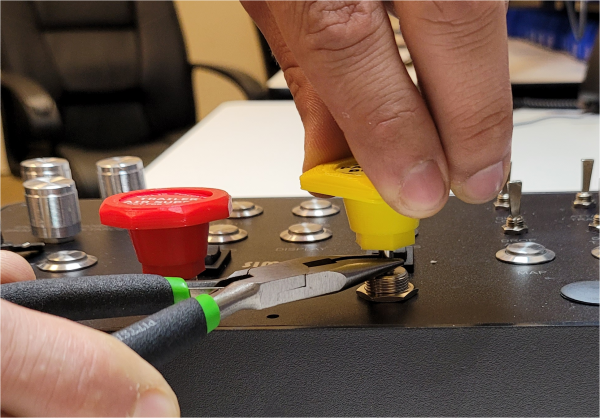
TO PROPERLY ADJUST THE KNOB AIR-GAP
- Pull out (extend) the switch to the FULL-OUT position.
- Using a pair of needle nose pliers, firmly prevent the switch shaft from turning, while hand twisting the knob in the required direction (clockwise to decrease the air-gap, counter-clockwise to increase the air-gap).
- Continue adjusting the air-gap (step 2), ensuring full travel of the switch while maintaining VERY little or NO (barely contacts surface) air-gap between the knob and switch surfaces.