 KNOWLEDGEBASE
CONVENTIONAL DISCREET PORTS:
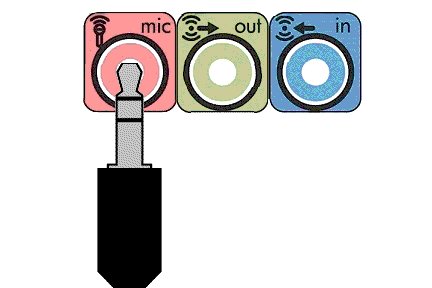
COMBINATION HEADSET PORT:

If your computer provides only a single "combination headset" port, a 3.5mm Headphone/Microphone Splitter Cable/Adapter similar to that shown below will be needed.
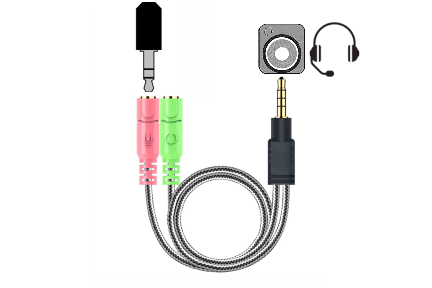
Available from Amazon or your local electronics supply outlet.
Once properly connected (see above), the CB Microphone incorporated within your SIM-PANEL is recognized and initialized as a standard, non-powered audio microphone by the operating system (Microsoft Windows, IOS etc.), and thus may require further setup and/or configuration to designate it as the default audio input device, adjust the microphone volume, activate microphone boost (if applicable), and/or activate any other available options that may be offered by the installed AUDIO DEVICE (Sound Card etc.) to enhance recording volume and fidelity.
Although the process for configuring your particular sound device may differ, the process should be quite similar to that described below...
In the bottom right corner of your screen, you will notice the volume icon in the system tray.

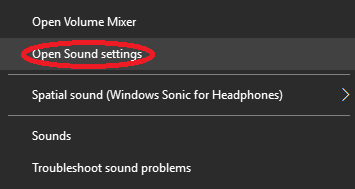
Right-Click on the volume icon and select "Open Sound Settings".
Within the "Sound" settings window, look for "Input", "Choose your input device" and then select the "Device properties" link (circled in red) in the screenshot below..
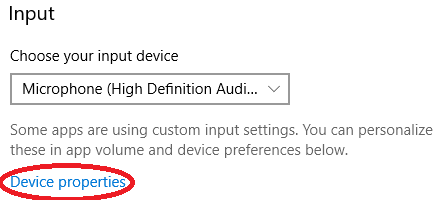
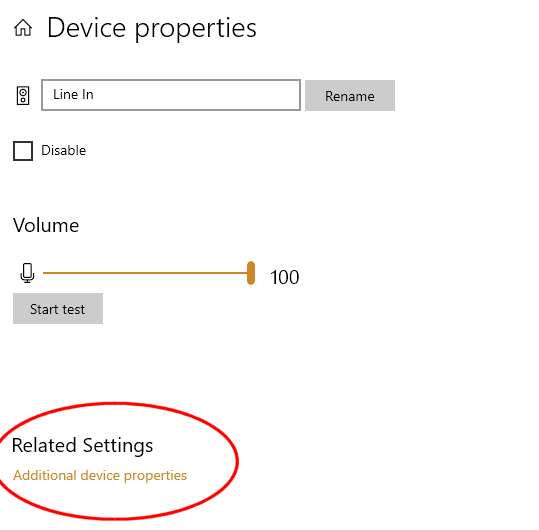
Within the "Device Properties" window, select the "Additional device properties" link (circled in red) in the screenshot below..
Within the the "Microphone Properties" window. Select the "Levels" tab and adjust your microphone volume settings as desired.
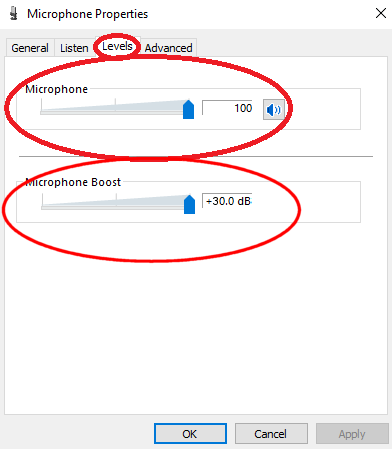
MICROPHONE VOLUME LEVEL
The volume level does not have to be at 100%, but should be high enough that the computer can detect audio.
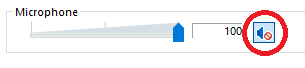
Please make sure that your microphone is not muted. If you see the icon below, click the speaker icon to un-mute.
MICROPHONE BOOST LEVEL (If available - see note below)
Adjust the "Microphone Boost" as desired.

NOTE: If "Microphone Boost" is not available, the audio device (sound card) within your computer may unfortunately be incompatible with standard, non-powered microphones such as incorporated within your SIM-PANEL Button Box. Please contact Customer Support for further assistance.Once you determine the best settings for you and your system, click OK to save the settings and then close all settings windows upon completion of adjusting your microphone volume settings.