KNOWLEDGEBASE
KNOWLEDGEBASE
KNOWLEDGEBASE
Are you experiencing occasional and intermittent delays and/or disconnects of your USB connected SIM-PANEL Controller?
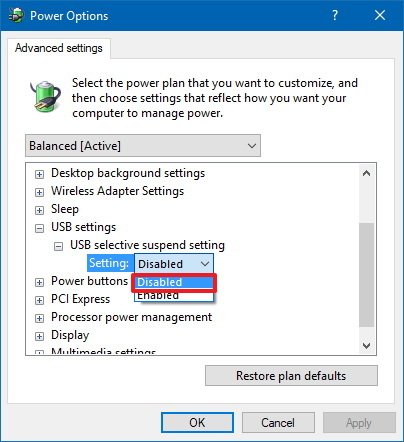
It's quite possible that the attached USB port may simply be getting suspended, or put to sleep by Windows at times in an effort to conserve power. You may wish to try disabling "USB Selective Suspend" by following these steps...
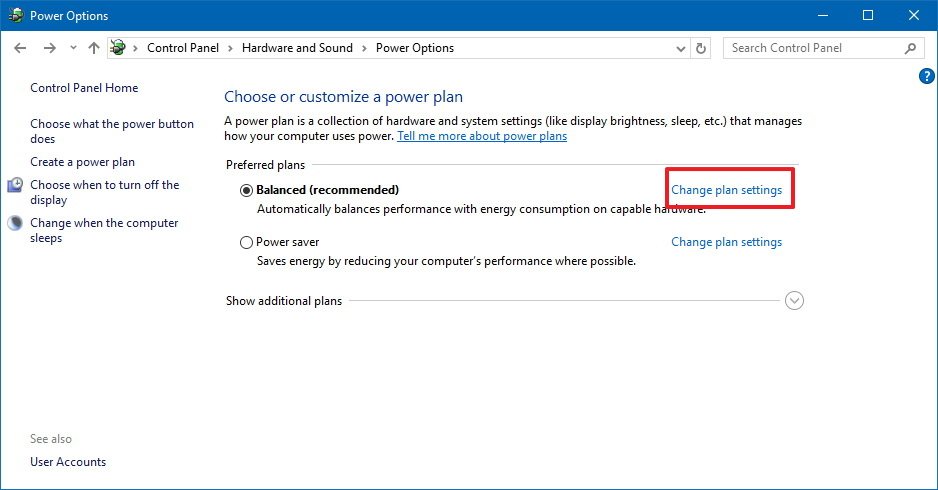
4. Select the Change plan settings link for the plan you're currently using. (If you change the settings on the power plan that isn't active, this won't work.)
5. Select the Change advanced power settings link.